




Introduction to Agentic AI & Frameworks
November 09, 2025
6 min
In the first post of this series, we explored the agentic AI landscape and why frameworks like Strands and LangGraph are essential for building production-ready agents. Now it’s time to get hands-on. In this post, we’ll dive deep into Strands, building progressively complex agents from a simple conversational bot to a tool-using AI worker. By the end, you’ll understand Strands’ core concepts and be ready to build your own agents.
TL;DR: Learn Strands from the ground up with practical examples. We’ll cover installation, core concepts (Agent, Model, Tools, Hooks), multiple model providers (Ollama, Bedrock, OpenAI), three approaches to building tools, streaming responses, and lifecycle hooks. All code examples are runnable and available on GitHub.
Before we dive into code, let’s quickly recap why Strands is an excellent choice for building AI agents:
Strands emphasizes simplicity without sacrificing power. Now, let’s see it in action!
You’ll need Python 3.10 or later. I recommend using a Python virtual environment to keep your packages isolated.
First, create and activate a virtual environment:
# Create a virtual environmentpython -m venv .venv# Activate it (macOS/Linux)source .venv/bin/activate# Activate it (Windows).venv\Scripts\activate
Then install Strands:
# Install Strands and community toolspip install strands-agents strands-agents-tools
That’s it! The base package includes everything you need to get started.
Note: By default, Strands uses Amazon Bedrock (Claude 4 Sonnet in us-west-2). You’ll need AWS credentials configured and model access enabled. Don’t have an AWS account? No problem - I’ll show you how to use free local models with Ollama below.
Before building agents, let’s understand Strands’ key components:
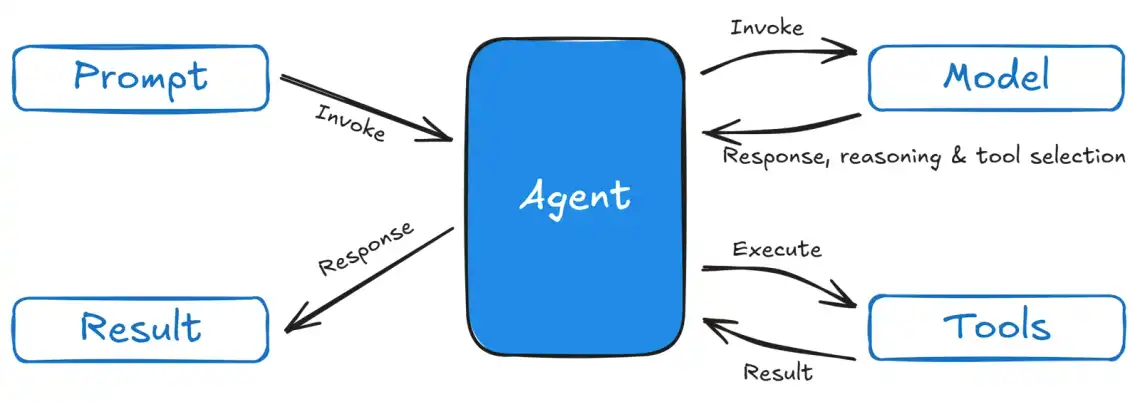
The Agent is your primary interface. It orchestrates the model, tools, and execution flow:
from strands import Agentagent = Agent(model=my_model, # The LLM to usesystem_prompt="You are a ...", # Guide agent behaviortools=[tool1, tool2], # Tools the agent can usename="MyAgent", # Optional: agent namedescription="...", # Optional: agent descriptionhooks=[hook1, hook2] # Optional: lifecycle hooks)
Models are LLM providers wrapped in a consistent interface. At the time of writing, Strands supported:
Tools extend agent capabilities beyond text generation. They can:
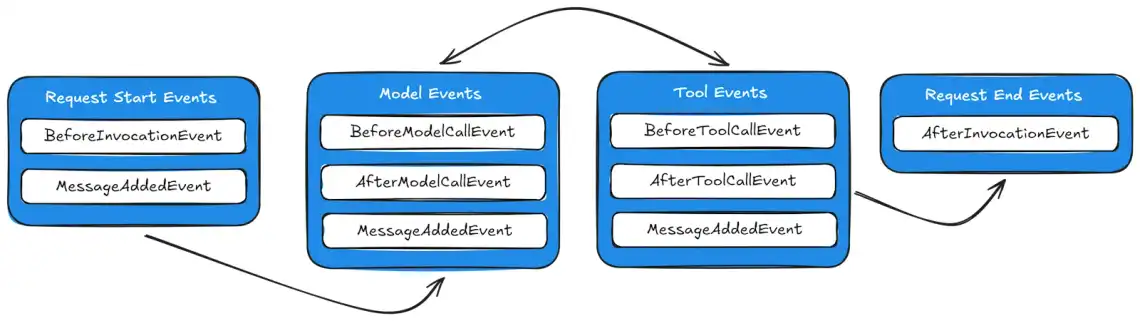
Hooks let you monitor and modify agent behavior at key lifecycle points:
We’ll explore each of these concepts in depth with practical examples.
Let’s build the simplest possible agent - one that just talks. With Strands, this is literally 3 lines of code:
from strands import Agentagent = Agent()agent("Tell me a joke about AI agents")
That’s it! Run this code and you’ll get a response from Claude 4 Sonnet via Amazon Bedrock. The agent handles everything automatically.
Don’t have AWS credentials? No problem. Let’s use Ollama to run models locally for free:
First, install and setup Ollama:
# macOS/Linux: Install via scriptcurl -fsSL https://ollama.ai/install.sh | sh# Windows: Download installer from https://ollama.ai/download# Pull a model (llama3.2 is fast and capable)ollama pull llama3.2# Start the Ollama server (In case it doesn't auto-start)ollama serve
Docker alternative: See Ollama’s official Docker guide
Then install the Ollama extra:
pip install 'strands-agents[ollama]'
Now use it in your agent:
from strands import Agentfrom strands.models.ollama import OllamaModelmodel = OllamaModel(host="http://localhost:11434",model_id="llama3.2")agent = Agent(model=model)agent("Tell me a joke about AI agents")
The agent prints the response to stdout by default - perfect for quick testing!
By default, agent() prints the response to stdout and returns it. You can customize this behavior:
# Get the response without printingagent = Agent(model=model, callback_handler=None)response = agent("What is 2+2?")print(f"Agent said: {response}")
Guide your agent’s behavior with a system prompt:
agent = Agent(model=model,system_prompt="You are a helpful assistant that provides concise, technical responses.")agent("Explain what an API is")# Gets a concise, technical explanation
The system prompt sets the agent’s personality, expertise level, and response style.
Strands makes it easy to switch between model providers. The base package includes Bedrock support. For other providers, install the corresponding extra.
AWS-managed models with enterprise features - no extra installation needed:
from strands import Agentfrom strands.models.bedrock import BedrockModelmodel = BedrockModel(model_id="us.anthropic.claude-sonnet-4-5-20250929-v1:0",temperature=0.7,max_tokens=4096)agent = Agent(model=model)agent("What is agentic AI?")
Available models: Claude Sonnet 4.5, Claude Opus 4.1, Claude Haiku 4.5, Nova Premier/Pro/Lite/Micro, Llama 3.3, Mistral Large 2, and more
Note: Requires AWS credentials. As of October 2025, all serverless models are automatically enabled - no manual model access setup needed! Region is configured via AWS credentials/config (set
AWS_DEFAULT_REGIONenvironment variable or use~/.aws/config).
Perfect for development and learning:
pip install 'strands-agents[ollama]'
from strands import Agentfrom strands.models.ollama import OllamaModelmodel = OllamaModel(host="http://localhost:11434",model_id="llama3.2",temperature=0.7,keep_alive="10m",max_tokens=2000)agent = Agent(model=model)agent("What is agentic AI?")
Available models: llama3.3, llama3.2, llama3.1, qwen3, deepseek-r1, gemma3, mistral, phi4, and many more
Industry-standard models:
pip install 'strands-agents[openai]'
from strands import Agentfrom strands.models.openai import OpenAIModelmodel = OpenAIModel(model_id="gpt-5-nano",params={"max_completion_tokens": 2000}) # Set OPENAI_API_KEY env varagent = Agent(model=model)agent("What is agentic AI?")
Available models: gpt-5.1, gpt-5-mini, gpt-5-nano, gpt-4.5, gpt-4.1, o4-mini, o3, o3-mini
Quick setup: Create an API key at platform.openai.com/api-keys, add a few dollars credit, and set
OPENAI_API_KEYenvironment variable. Faster than Ollama, less setup than AWS!
Strands supports many other providers. Install the extras you need:
# Google Geminipip install 'strands-agents[gemini]'# Anthropic (direct API)pip install 'strands-agents[anthropic]'# LiteLLM (100+ models)pip install 'strands-agents[litellm]'# Or install all providerspip install 'strands-agents[all]'
You can update model configuration on the fly:
# Start with low temperature (more factual, consistent)model = OllamaModel(host="http://localhost:11434", model_id="llama3.2", temperature=0.1)agent = Agent(model=model)# Switch to high temperature (more creative, varied)model.update_config(temperature=1.0)# Or even let a tool change the configuration@tooldef switch_to_creative_mode(agent: Agent) -> str:"""Switch to a more creative model configuration."""agent.model.update_config(temperature=1.0)return "Switched to creative mode!"
Tools transform agents from chatbots into workers. Strands offers three approaches to defining tools, each with different trade-offs.
The @tool decorator turns regular Python functions into agent tools. It is a very popular option for adding tools due to the simplicity:
from strands import Agent, toolfrom strands.models.ollama import OllamaModel@tooldef get_weather(city: str, units: str = "celsius") -> str:"""Get current weather for a city.Args:city: The name of the cityunits: Temperature units (celsius or fahrenheit)"""# In a real app, you'd call a weather APIreturn f"Weather in {city}: 22°{units[0].upper()}, partly cloudy"@tooldef calculate(expression: str) -> str:"""Evaluate a mathematical expression.Args:expression: The math expression to evaluate (e.g., "2 + 2")"""try:result = eval(expression)return f"Result: {result}"except Exception as e:return f"Error: {str(e)}"# Create agent with toolsmodel = OllamaModel(host="http://localhost:11434", model_id="llama3.2")agent = Agent(model=model, tools=[get_weather, calculate])# The agent will automatically use tools when neededresponse = agent("What's the weather in London and what's 15 * 7?")print(response)
How it works:
When tools need to share state or resources, use class-based tools:
from strands import Agent, toolclass DatabaseTools:def __init__(self, connection_string: str):self.connection = self._connect(connection_string)self.query_count = 0def _connect(self, connection_string: str):# Simulate database connectionreturn {"connected": True, "db": "mydb"}@tooldef query_users(self, limit: int = 10) -> dict:"""Query users from the database.Args:limit: Maximum number of users to return"""self.query_count += 1return {"users": [f"user{i}" for i in range(limit)],"query_count": self.query_count}@tooldef get_stats(self) -> str:"""Get database statistics."""return f"Total queries executed: {self.query_count}"# Initialize tools with shared statedb_tools = DatabaseTools("postgresql://localhost/mydb")# Pass tool methods to agentagent = Agent(model=model,tools=[db_tools.query_users, db_tools.get_stats])response = agent("Show me 5 users, then tell me the stats")
When to use:
For tools that don’t require Strands imports - useful for sharing tools across projects or frameworks:
# weather_tool.pyTOOL_SPEC = {"name": "weather_tool","description": "Get current weather for a city","inputSchema": {"json": {"type": "object","properties": {"city": {"type": "string","description": "The city name"},"units": {"type": "string","enum": ["celsius", "fahrenheit"],"description": "Temperature units"}},"required": ["city"]}}}def weather_tool(tool, **kwargs):tool_input = tool["input"]city = tool_input.get("city")units = tool_input.get("units", "celsius")# Your implementation hereresult = f"Weather in {city}: 22°{units[0].upper()}"return {"toolUseId": tool["toolUseId"],"status": "success","content": [{"text": result}]}
Load it in your agent:
import weather_toolagent = Agent(model=model, tools=[weather_tool])
When to use:
| Aspect | @tool Decorator | Class-Based Tools | Module-Based Tools |
|---|---|---|---|
| Code Structure | Single function with decorator | Class with multiple @tool methods | Module with TOOL_SPEC dict + function |
| Best For | Simple, stateless tools | Tools sharing state/resources | Framework-independent tools |
| Complexity | Simplest | Medium | Most explicit |
| State Management | None | Shared across methods | Manual |
| Dependencies | Requires Strands | Requires Strands | No Strands imports in tool file |
| Example Use Case | Weather lookup, calculator | Database tools, API clients | Reusable across frameworks |
| Pros | Quick to write, clean syntax | OOP patterns, shared resources | No SDK dependency, portable |
| Cons | No state sharing | More boilerplate | Manual spec definition |
Strands provides a package of pre-built tools. First, install the package:
pip install strands-agents-tools
Note: Strands also supports the Model Context Protocol (MCP) for integrating external tools and services. We’ll cover building custom MCP tools with FastMCP in a dedicated post later in this series.
Then use the tools in your agent:
from strands import Agentfrom strands_tools import calculator, current_timeagent = Agent(tools=[calculator, current_time])response = agent("What time is it and what's 42 * 17?")
Available tools: calculator, current_time, and many more. See the Strands documentation for the full list.
Sometimes you need to call tools directly for testing or pre-populating agent knowledge:
from strands import Agentfrom strands_tools import calculatoragent = Agent(tools=[calculator])# Call tool directly (bypasses the agent loop)result = agent.tool.calculator(expression="sin(x)", mode="derive", wrt="x")print(result) # Derivative of sin(x)# Then use in conversationagent("What's the derivative of sin(x)?")
This is useful for:
For rapid development, enable automatic tool loading from a directory:
from strands import Agent# Agent watches ./tools/ directory for changesagent = Agent(load_tools_from_directory=True)# Add/modify tools in ./tools/ and they're automatically reloaded!agent("Use any tools you find")
This is perfect for iterating on tools without restarting your agent. Just save your tool files in the ./tools/ directory and Strands handles the rest.
For better user experience, stream responses as they’re generated:
from strands import Agentfrom strands.models.ollama import OllamaModelmodel = OllamaModel(host="http://localhost:11434", model_id="llama3.2")agent = Agent(model=model)# Stream with default callback handler (prints to stdout)agent("Write a short story about an AI agent")# The response streams to the console in real-time!
For web applications and async frameworks:
import asynciofrom strands import Agentfrom strands.models.ollama import OllamaModelasync def stream_example():model = OllamaModel(host="http://localhost:11434", model_id="llama3.2")agent = Agent(model=model, callback_handler=None)async for event in agent.stream_async("Tell me about Cape Town"):if "data" in event:# Stream text chunksprint(event["data"], end="", flush=True)elif "current_tool_use" in event:# Tool is being usedtool_name = event["current_tool_use"].get("name")if tool_name:print(f"\n[Using tool: {tool_name}]\n")asyncio.run(stream_example())
Want to expose your agent as a web API? Here’s how to build a streaming HTTP endpoint that clients can call to get real-time responses. This is perfect for chat interfaces, web apps, or any service that needs to integrate with your agent over HTTP:
from fastapi import FastAPIfrom fastapi.responses import StreamingResponsefrom pydantic import BaseModelfrom strands import Agentfrom strands.models.ollama import OllamaModelapp = FastAPI()class PromptRequest(BaseModel):prompt: str@app.post("/stream")async def stream_response(request: PromptRequest):async def generate():model = OllamaModel(host="http://localhost:11434", model_id="llama3.2")agent = Agent(model=model, callback_handler=None)async for event in agent.stream_async(request.prompt):if "data" in event:yield event["data"]return StreamingResponse(generate(), media_type="text/plain")
Sometimes you need more than text - you need structured data you can work with programmatically. Strands makes this easy with Pydantic models:
from strands import Agentfrom pydantic import BaseModel, Field# Define the structure you wantclass WeatherData(BaseModel):"""Structured weather information"""city: str = Field(description="City name")temperature: int = Field(description="Temperature in Celsius")condition: str = Field(description="Weather condition")humidity: int = Field(description="Humidity percentage")agent = Agent()# Get structured output instead of textresult = agent("The weather in London is 18°C, partly cloudy with 65% humidity",structured_output_model=WeatherData)# Access typed fields directlyweather: WeatherData = result.structured_outputprint(f"{weather.city}: {weather.temperature}°C, {weather.condition}")# Output: London: 18°C, partly cloudy
Why use structured output?
This works with all model providers and can be combined with tools. Perfect for extracting data, building APIs, or integrating with databases.
By default, agents forget everything when your program restarts. Session management fixes this:
from strands import Agentfrom strands.session.file_session_manager import FileSessionManager# Create a session managersession_manager = FileSessionManager(session_id="user-123")# Agent with memoryagent = Agent(session_manager=session_manager)# First conversationagent("My name is Alice and I love Python")# Later (even after restart)...agent("What's my name?") # "Your name is Alice"agent("What do I love?") # "You love Python"
The agent automatically persists:
For production, use S3 instead of local files. This is ideal for distributed deployments where multiple instances need to share session state:
from strands.session.s3_session_manager import S3SessionManagersession_manager = S3SessionManager(session_id="user-456",bucket="my-agent-sessions",region_name="us-east-1")agent = Agent(session_manager=session_manager)
Note: Amazon Bedrock AgentCore provides built-in memory management that’s more elegant than manual S3 session persistence. We’ll cover AgentCore deployment and its memory features in a future post in this series.
For more details on session management, including custom repositories and multi-agent sessions, see the Session Management documentation.
Session management is essential for:
Hooks let you tap into the agent lifecycle to add logging, monitoring, validation, or custom behavior.
from strands import Agentfrom strands.hooks import HookProvider, HookRegistry, BeforeInvocationEvent, AfterInvocationEventclass LoggingHook(HookProvider):def register_hooks(self, registry: HookRegistry) -> None:registry.add_callback(BeforeInvocationEvent, self.log_start)registry.add_callback(AfterInvocationEvent, self.log_end)def log_start(self, event: BeforeInvocationEvent) -> None:print(f"🚀 Agent '{event.agent.name}' starting request")def log_end(self, event: AfterInvocationEvent) -> None:print(f"✅ Agent '{event.agent.name}' completed request")# Use the hookagent = Agent(model=model,name="MyAgent",hooks=[LoggingHook()])agent("Hello!")# Output:# 🚀 Agent 'MyAgent' starting request# [agent response]# ✅ Agent 'MyAgent' completed request
Track tool usage and execution time:
from strands.hooks import BeforeToolCallEvent, AfterToolCallEventimport timeclass ToolMonitor(HookProvider):def __init__(self):self.tool_times = {}def register_hooks(self, registry: HookRegistry) -> None:registry.add_callback(BeforeToolCallEvent, self.before_tool)registry.add_callback(AfterToolCallEvent, self.after_tool)def before_tool(self, event: BeforeToolCallEvent) -> None:tool_name = event.tool_use["name"]self.tool_times[tool_name] = time.time()print(f"🔧 Calling tool: {tool_name}")def after_tool(self, event: AfterToolCallEvent) -> None:tool_name = event.tool_use["name"]elapsed = time.time() - self.tool_times.get(tool_name, 0)print(f"✓ Tool {tool_name} completed in {elapsed:.2f}s")monitor = ToolMonitor()agent = Agent(model=model, tools=[get_weather], hooks=[monitor])agent("What's the weather in Paris?")# Output:# 🔧 Calling tool: get_weather# ✓ Tool get_weather completed in 0.05s
| Event | When It Fires |
|---|---|
AgentInitializedEvent | After agent construction |
BeforeInvocationEvent | Start of agent request |
AfterInvocationEvent | End of agent request |
MessageAddedEvent | When a message is added to history |
BeforeModelCallEvent | Before calling the LLM |
AfterModelCallEvent | After LLM responds |
BeforeToolCallEvent | Before executing a tool |
AfterToolCallEvent | After tool execution |
Let’s combine everything we’ve learned into a practical weather assistant agent:
from strands import Agent, toolfrom strands.models.ollama import OllamaModelfrom strands.hooks import HookProvider, HookRegistry, BeforeToolCallEventimport requests# Define tools@tooldef get_weather(city: str) -> dict:"""Get current weather for a city.Args:city: The city name"""# Using a real weather API (you'll need an API key)# For demo, we'll simulate the responsereturn {"city": city,"temperature": 22,"condition": "Partly cloudy","humidity": 65,"wind_speed": 15}@tooldef get_forecast(city: str, days: int = 3) -> dict:"""Get weather forecast for a city.Args:city: The city namedays: Number of days to forecast (1-7)"""return {"city": city,"forecast": [{"day": 1, "temp": 23, "condition": "Sunny"},{"day": 2, "temp": 21, "condition": "Cloudy"},{"day": 3, "temp": 19, "condition": "Rainy"}][:days]}@tooldef convert_temperature(temp: float, from_unit: str, to_unit: str) -> float:"""Convert temperature between Celsius and Fahrenheit.Args:temp: Temperature valuefrom_unit: Source unit (celsius or fahrenheit)to_unit: Target unit (celsius or fahrenheit)"""if from_unit == "celsius" and to_unit == "fahrenheit":return (temp * 9/5) + 32elif from_unit == "fahrenheit" and to_unit == "celsius":return (temp - 32) * 5/9return temp# Create a logging hookclass WeatherAgentHook(HookProvider):def register_hooks(self, registry: HookRegistry) -> None:registry.add_callback(BeforeToolCallEvent, self.log_tool)def log_tool(self, event: BeforeToolCallEvent) -> None:tool_name = event.tool_use["name"]tool_input = event.tool_use["input"]print(f"📍 Using {tool_name} with: {tool_input}")# Create the agent (uses Bedrock by default)agent = Agent(name="WeatherAssistant",description="A helpful weather assistant that provides current weather and forecasts",tools=[get_weather, get_forecast, convert_temperature],hooks=[WeatherAgentHook()])# Or use Ollama for local development# from strands.models.ollama import OllamaModel# model = OllamaModel(host="http://localhost:11434", model_id="llama3.2")# agent = Agent(model=model, name="WeatherAssistant", ...)# Use the agentprint("=== Weather Assistant ===\n")# Simple queryagent("What's the weather in London?")print("\n" + "="*50 + "\n")# Complex query requiring multiple toolsagent("Get the 5-day forecast for Tokyo and convert the temperatures to Fahrenheit")print("\n" + "="*50 + "\n")# Conversational follow-upagent("What about Paris?")
This example demonstrates:
# Good: Clear, focused tool with structured output@tooldef search_products(query: str, max_results: int = 10) -> dict:"""Search for products in the catalog.Args:query: Search query stringmax_results: Maximum number of results to return"""results = database.search(query, limit=max_results)return {"status": "success","products": results,"count": len(results)}# Avoid: Vague, multi-purpose tool@tooldef do_stuff(action: str, data: dict) -> dict:"""Does various things.""" # Too vague!pass
Choose models based on your requirements:
For Development:
For Production:
By Use Case:
Key Considerations:
While Strands handles most prompting automatically, you can guide the agent:
agent = Agent(model=model,name="DataAnalyst",description="An expert data analyst who provides detailed statistical analysis",tools=[analyze_data, create_chart])# The agent's name and description influence its behavior
@tooldef risky_operation(param: str) -> dict:"""Perform a risky operation.Args:param: Operation parameter"""try:result = dangerous_function(param)return {"status": "success", "result": result}except Exception as e:# Return error as tool result, don't raisereturn {"status": "error", "message": str(e)}
Test your tools independently before adding them to agents:
# Test tools directlyresult = get_weather("London")assert "temperature" in result# Test agent with specific promptsagent = Agent(model=model, tools=[get_weather])response = agent("What's the weather in London?")assert "London" in response
Enable debug logging when troubleshooting:
import logging# Enable Strands debug logslogging.getLogger("strands").setLevel(logging.DEBUG)# Configure log formatlogging.basicConfig(format="%(levelname)s | %(name)s | %(message)s",handlers=[logging.StreamHandler()])agent = Agent(tools=[my_tool])result = agent("Test query")# Check metricsprint(f"Total tokens: {result.metrics.accumulated_usage['totalTokens']}")print(f"Latency: {result.metrics.accumulated_metrics['latencyMs']}ms")print(f"Cycles: {result.metrics.cycle_count}")# Inspect conversation historyfor msg in agent.messages:print(f"{msg['role']}: {msg['content']}")
Metrics help you:
Building agents is one thing - running them reliably in production is another. Here are key considerations:
Strands uses OpenTelemetry (OTEL) to emit telemetry data for monitoring:
This integrates with tools like AWS X-Ray, Datadog, or any OTEL-compatible backend.
You will get your hands dirty in an upcoming blog post where you will set up and see OTEL in action.
Amazon Bedrock provides a built-in guardrails framework that integrates with Strands. Configure guardrails in your code to enable safety features:
from strands.models import BedrockModelmodel = BedrockModel(model_id="us.anthropic.claude-sonnet-4-5-20250929-v1:0",guardrail_id="your-guardrail-id",guardrail_version="1")agent = Agent(model=model)
First create your guardrails in the Bedrock console, then reference them in your code. For more details, see the Guardrails documentation.
Strands agents can run anywhere:
For a deep dive into production deployment, observability, and multi-agent architectures, check out the AWS Strands Agents Workshop.
You now have a solid foundation in Strands! You can:
Coming up in this series:
Each post includes working code examples you can run immediately.
All code examples from this post are available in the GitHub repository. Clone it and start experimenting:
git clone https://github.com/janobarnard/agentic-ai.gitcd agentic-ai/blog-series/02-strands-basicspip install -r requirements.txtpython hello_strands.py
Each example builds on the previous one, so you can follow along step by step or jump to the sections that interest you most.
Happy building!

Quick Links
Legal Stuff